Building ParkingQuest on Cloudflare Workers
I recently released ParkingQuest, an iOS app that shows live available spaces for Transport for NSW Park&Ride car parks on your Lock Screen. In this blog post I’m going to walk through how the backend is architected, and in particular how I dealt with the API rate limits, which ended up shaping pretty much every other decision.
Setting the context
If you drive to a Park&Ride station in Sydney, you already know the problem. You leave home, drive for ten minutes, and only find out whether there was a space once you get there. If there isn’t one, you circle the car park a couple of times and then end up parking on some side street and walking to the platform.
Transport for NSW actually publishes live occupancy data for every Park&Ride facility as part of their Open Data program. The data exists and there are many websites and apps available to see this data, but you have to go and pull that data out by going to the app and clicking your car park, and when it changes in a minute, you click again. When you are rushing to get the train to reach your office on time, you don’t have time to do all of that, like a maniac. So I built an app around it. You pick the car parks you use, you tell it the days and times you commute, and it puts the available occupancy on your Lock Screen during those hours (and stays quiet the rest of the day). So you drive and you are kept updated on the availability without sweating much.
The app itself is SwiftUI with a Live Activity extension. That part was fairly straightforward. The interesting bit was the backend, so that’s what I’m going to focus on here.
The challenge with rate limits
The Transport NSW Car Park API gives you three things to work with:
- A daily quota of 60,000 requests
- A rate limit of 5 requests per second
- An API key that identifies you (the developer), not the end user
My working model of this app was to build it so that users don’t have to create any account whatsoever and it has to be as low touch as possible. So, pretty much everything has to be done on the backend and the app is just a thin client.
Now, the API rate limits are pretty low and if many users are using the app (hopefully), I still need to be under/at that limit. Which means I can’t simply make multiple API calls for each device.
Let’s say a user monitors 2 car parks and wants a refresh every minute during a 2 hour window. That works out to:
2 car parks × 60 minutes × 2 hours = 240 requests per user per dayDivide the daily quota by that and you get roughly 250 users before the quota is gone. That’s obviously not going to work for an app you intend to put on the App Store.
Components
Before getting into the design, let’s quickly cover the pieces I’m using. Everything runs on Cloudflare, mostly because the free tier is generous and I didn’t want a monthly bill for a free app.
- Cloudflare Workers - the API itself, written in TypeScript with Hono. Workers also support scheduled (cron) triggers, which is what does the heavy lifting here.
- D1 - Cloudflare’s SQLite database. This holds registered devices, their schedules, and the latest occupancy reading per car park.
- Workers KV - key/value store, used for the static car park list and a couple of cached tokens.
- APNs - Apple Push Notification service, used to drive the Live Activity on the device.
- Cloudflare Pages - for the marketing site, which is just static HTML.
The architecture
The key realisation, and honestly the thing the whole app depends on, is that the cost of the data is per car park, not per user.
If ten thousand people are watching the same car park, they need exactly one API call per minute between them. The proxy design makes ten thousand calls to fetch the same number. So instead of the app asking the backend which asks Transport NSW, I inverted the flow. Nothing polls on demand. A single Worker cron runs every minute and does this:
- Load every registered device from D1
- Filter down to devices whose monitoring window is open right now, in the device’s own timezone
- Build a
car park -> [devices]map from whatever is left - Fetch each unique car park once
- Compare against the previous reading and push to the devices that care
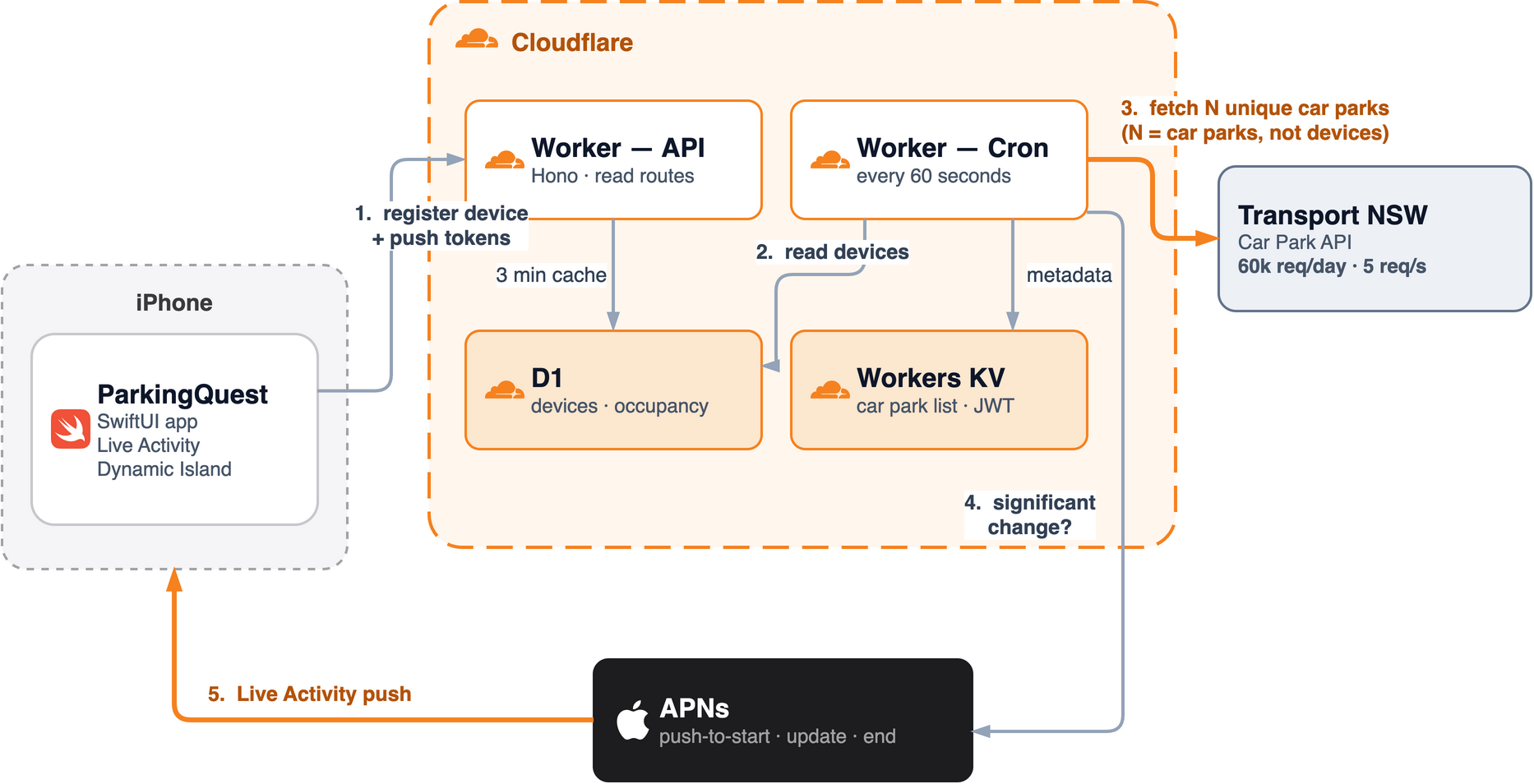
Step 4 is where all the savings come from. The number of API calls is driven by how many distinct car parks are being watched, which is bounded by the number of facilities in NSW (less than fifty). It doesn’t move at all when a thousand new users sign up.
Step 2 turns out to matter almost as much. Most people commute on a schedule, so at 3am nobody’s window is open, the map is empty, and the cron returns without making a single API call. The quota only gets used during the hours when it needs to be.
For a typical day this comes out at something like:
10 unique car parks × 60 minutes × 12 hours = 7,200 calls per dayWhich is around 12% of the quota, and that number stays flat whether there are 10 users or 10,000.
Staying under 5 requests per second
The fetch loop is deliberately sequential with a small delay, which keeps it under the per-second limit without any batching logic:
for (const id of carParkMap.keys()) {
  try {
    const occ = await fetchCarParkOccupancy(id, env.TRANSPORT_NSW_API_KEY);
    results.push({ id, occupancy: occ });

    // Small delay to be respectful to the API
    await new Promise(resolve => setTimeout(resolve, 200));
  } catch (err) {
    console.error(`[cron] Fetch failed for car park ${id}:`, err);
    // Continue with other car parks
  }
}
The try/catch is inside the loop on purpose. One facility returning bad data shouldn’t take down the other nine. If a fetch does fail, the car park falls back to its last known value from D1, so a temporary glitch shows a slightly stale number rather than making the card disappear from the user’s Lock Screen entirely.
Serving the app
The cron takes care of car parks that are actively being monitored. But the app also needs data for car parks nobody is watching at the moment, for example when a user is browsing the list and taps on one for the first time.
For this, D1 acts as the cache. Every read goes to D1 first and only falls through to Transport NSW if the row is missing or older than three minutes:
const OCCUPANCY_STALE_MS = 3 * 60 * 1000;Car parks under active monitoring are being refreshed every 60 seconds by the cron anyway, so they never hit this path. It really only fires for a car park that has just been selected and has no row in D1 yet, which would otherwise return nothing at all.
The static car park list (IDs, names, coordinates) lives in KV rather than D1. It’s read on every app launch and it changes maybe twice a year, so it’s a good fit. A second cron trigger refreshes it once a week on Sunday at midnight Sydney time.
Apple has rate limits too
Going in, I was aware of the API rate limits from Transport NSW and I planned for that; however, it was a bit of a learning curve to work around Apple’s APNs rate limits. I mean, the entire point of this app was to serve the occupancy via the Dynamic Island and Live Activities, and this is where the bulk of the effort went to get it right (well, almost).
APNs provider tokens
You authenticate to APNs using a signed JWT. The token is valid for an hour, but Apple will also reject you with 429 TooManyProviderTokenUpdates if you generate a new one more often than once every 20 minutes.
A cron that runs every minute finds this out pretty quickly. The fix was to cache the token in KV, keyed by team ID and key ID, and reuse it based on its age:
const TOKEN_LIFETIME_SECONDS = 3600;   // Apple's expiry
const REUSE_MAX_AGE_SECONDS  = 2700;   // refresh at 45 minutes
That sits comfortably between the 20 minute floor and the 60 minute ceiling.
The Live Activity update budget
This one is more interesting. iOS gives each Live Activity a budget of push updates. If you exhaust it, the system throttles your activity and prompts the user about it, which is not a great experience. A backend that runs every minute will burn through that budget on day one if it pushes on every tick.
Two things sorted it out.
First, only push when there is a significant change. I define significance by the available-space count rather than a percentage:
const nearlyFull = Math.min(current.available, previous.available) <= 20;
const hasSignificantSpacesChange = nearlyFull
  ? availableSpacesChange >= 1   // every space matters when it's nearly full
  : availableSpacesChange > 1;   // plenty of room, don't push over one car
My first version triggered on occupancy percentage, which was a mistake. On a 100 space car park, one car is a 1% move, so it pushed on essentially every change and quietly overrode the count-based rule sitting underneath it. Rounded percentages make for poor triggers.
Second, and this is the more useful lever, use the apns-priority header properly. Routine occupancy churn goes out at priority 5, which iOS is free to coalesce and deliver when convenient. Only changes that actually affect the user’s decision get priority 10 and immediate delivery:
- the car park flipping between full and available
- a car park with 20 or fewer spaces left, where every single space counts
- a drop of 8 or more spaces in one tick, which is the “it’s filling up right now” case
Everything else can wait. A three space lag on a car park with 200 free spaces isn’t going to change anybody’s mind about where to drive.
That does leave one gap. A car park sitting at zero spaces for two hours never produces a significant change, so the “Updated” timestamp on the card freezes and starts to look like the app is broken, when the data is simply static. So there is a heartbeat as well - every active Live Activity gets a priority 10 refresh on a 10 minute wall clock boundary regardless of whether anything changed. On a locked phone, iOS batches the priority 5 updates quite aggressively, so this heartbeat is what actually caps how stale the card can look.
Push, not poll
The app never polls in the background. Background iOS apps aren’t reliable at that anyway, and it would defeat the whole fan-in approach.
Instead the entire update path runs through APNs:
- The app registers a push-to-start token (iOS 17.2 and above). The user doesn’t need to open the app to begin monitoring, the backend starts the Live Activity itself when the schedule window opens.
- Once the activity is running it has its own update token, which the app registers with the backend.
- When the window closes, the backend sends an
endevent with a dismissal date.
This state machine is where nearly all of the real bugs turned out to live. A couple of examples:
Dead tokens are not interchangeable. A 410 Gone on an update push means the activity ended on the device. A 410 on a start push means the push-to-start token itself is dead. My first version cleared everything in both cases, which left devices with no start token at all until they happened to re-register, so the Live Activity would silently just never start again.
The buffered window overlaps with the end event. The active window check has a one minute buffer to allow for cron timing jitter, which means a device is still eligible for an update on the same tick that its end push goes out. Sending an update microseconds after an end brings back the card you just dismissed. Devices that are ending their window are now explicitly excluded from that tick’s update set.
Self-healing needs a fuse. If a start push fails it’s reasonable to retry it, but only once. My first attempt retried whenever the update token was missing, which also matched the perfectly healthy case of a locked phone being slow to check its token in, and ended up pushing a fresh start every couple of minutes for an entire monitoring window.
None of these show up when you’re testing on an unlocked phone sitting on your desk.
Securing the API
There are no user accounts in ParkingQuest. No email, no password, nothing to leak. But the API still can’t be wide open.
I landed on using App Attest to secure comms between the app and backend:
- The app requests a challenge. The Worker generates 32 random bytes and stores them in KV with a 5 minute, single use TTL.
- The app signs the challenge using
DCAppAttestService, which proves it is a genuine instance of my app running on real Apple hardware. - The Worker verifies the attestation and mints a 32 byte bearer token bound to that one device ID.
- Only the SHA-256 hash of the token is stored. The raw token never goes into D1 or the logs.
The detail that matters most for correctness is that the route handlers read the caller’s identity from c.get('deviceId'), which is set by the auth middleware, and never from the URL or the request body. Without that you have an API where any device can read or modify another device’s record just by changing an ID in the path.
On top of that, all public traffic sits behind Cloudflare’s native rate limiting binding at 120 requests per minute per IP. It’s worth pointing out that this binding doesn’t touch KV or D1 at all, so it costs nothing against those budgets.
My app is iOS only, but a similar approach should work for Android as well.
Hosting and CI/CD
Everything runs on Cloudflare, split into two fully isolated environments:
| Production | Development | |
|---|---|---|
| Trigger branch | release | main |
| Worker | parkingquest | parkingquest-dev |
| D1 database | parkingquest | parkingquest-dev |
| KV namespace | separate | separate |
| APNs environment | production | sandbox |
Separate D1 and KV per environment means testing on dev can never touch production data. DEBUG builds of the iOS app talk to the dev Worker and Release builds talk to production, so there’s nothing to remember or toggle.
GitHub Actions handles deployment. On a push touching api/** it runs the tests, applies any D1 migrations and deploys the Worker (release goes to production, main goes to dev). A second workflow deploys the Pages site on changes to web/**.
One last thing worth mentioning on the D1 side. The cron only writes car parks whose occupancy has actually changed since the last tick:
const changedStatements = results
  .filter(({ id, occupancy }) => {
    const prev = previousOccupancy.get(id);
    return !prev || occupancyDiffers(prev, occupancy);
  })
  .map(({ id, occupancy }) => upsertOccupancyStatement(db, id, occupancy, nowIso));
A quiet minute costs zero writes instead of a full snapshot write. Across 1,440 ticks a day that’s a meaningful difference, and it’s what keeps this comfortably inside the free tier. Total hosting cost so far is nothing.
My overall experience building this app
This was a great learning experience for me, building my very first iOS app! Of course, I used AI to build this app end to end, but this is not something I winged in a few days or a week. This app took months and many iterations to get to the final form that I could publish. I started this low key last year and then kept picking it up every now and then to add/change things. I have used various agents/harnesses to build this app, but it was mostly done by Claude (whatever latest models kept getting published) with Claude Code as the agent harness. Throughout building this app, I saw the progress that these AI models have made over the months, and it was truly amazing to watch. Towards the end, the entire app build, signing and publishing to TestFlight and all the way to the App Store (as a draft) was driven by the agents without fiddling too much with Xcode, if at all!
Publishing to the App Store was a smooth experience as well. It took almost a week for the first version to be published, and from then on, every version took about a day.
But overall, I still found working with iOS and dealing with Xcode etc. a bit slower and more tedious compared to web apps, which agents simply sail through without lifting a finger. But the experience and quality of an iOS/Mac app is well worth it, I suppose.
Conclusion
Anyways, so this is how I published my first iOS app! Hope you liked the breakdown of how I built this. If you are in Sydney and drive to your nearest station for your commutes, I’d love for you to give this app a try and let me know what you think.
The app is on the App Store, it’s free, and it needs iOS 16.2 or later.
Cheers
Read next